
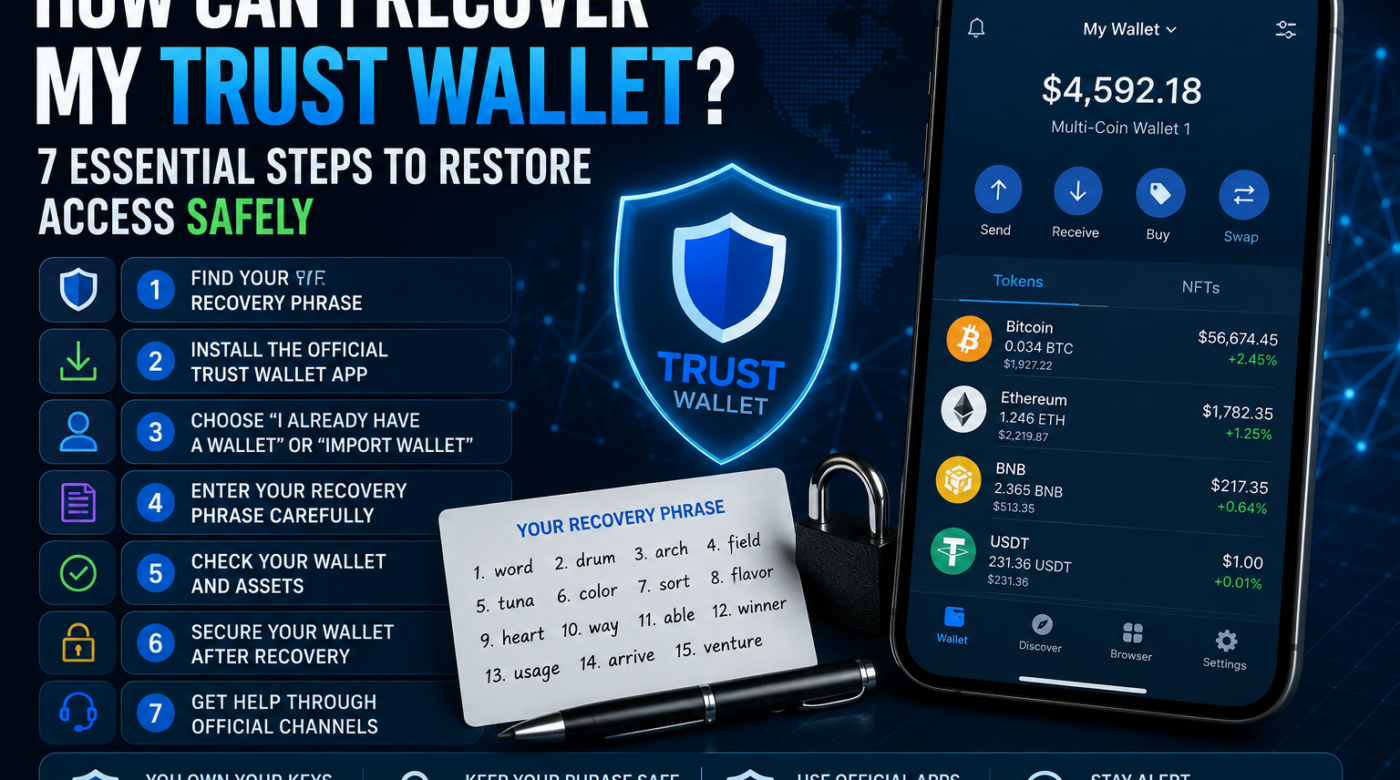
If you are asking, “how can I recover my Trust Wallet?”, the answer depends on what you have lost.
You may have lost your phone, forgotten your app password, deleted the Trust Wallet application, or simply need to restore your wallet on a new device. In many of these situations, you may still be able to regain access if you have your correct recovery phrase or another supported backup method.
However, if you have lost your recovery phrase and no longer have access to an active wallet session, recovering access can be much more difficult or impossible.
Understanding the difference between recovering access to your wallet and recovering cryptocurrency that has already been sent away is extremely important.
This guide explains how to recover access safely, what information you may need, common mistakes to avoid, and what to do if you believe your wallet or cryptocurrency has been compromised.
Table of Contents
- What Does Recovering a Trust Wallet Mean?
- How Can I Recover My Trust Wallet?
- Step 1: Find Your Recovery Phrase
- Step 2: Install the Official App
- Step 3: Choose to Import an Existing Wallet
- Step 4: Enter Your Recovery Phrase Carefully
- Step 5: Check Your Wallet and Assets
- Step 6: Secure Your Wallet
- Step 7: Get Help Through Official Channels
- What If I Forgot My Password?
- What If I Lost My Recovery Phrase?
- What If My Cryptocurrency Was Stolen?
- Common Trust Wallet Recovery Scams
- Frequently Asked Questions
- Final Thoughts
What Does Recovering a Trust Wallet Mean?
When people search for how can I recover my Trust Wallet, they may be referring to several different situations.
For example, you may have:
- Lost your phone
- Purchased a new phone
- Deleted the Trust Wallet application
- Forgotten your app password
- Accidentally removed your wallet from a device
- Lost access to a device
- Stopped seeing your cryptocurrency balance
- Had your wallet compromised
- Lost your recovery phrase
Each situation may require a different solution.
In general, recovering a wallet means restoring access to the same blockchain addresses and digital assets that were previously connected to your wallet.
Because Trust Wallet is a self-custody wallet, access is connected to the credentials that control the wallet rather than a traditional “forgot password” system.
This is why your recovery phrase is extremely important.
How Can I Recover My Trust Wallet?
If you still have your correct recovery phrase, you may be able to restore your wallet on a supported device.
A recovery phrase is typically a sequence of words that acts as a backup for your wallet.
Before starting, make sure you understand exactly which wallet you are trying to restore.
Do not enter your recovery phrase into:
- Random websites
- Search forms
- Social media messages
- Unknown applications
- Online “wallet recovery” forms
- Links sent by strangers
- Websites claiming that they need to verify your wallet
Your recovery phrase should remain private.
Step 1: Find Your Trust Wallet Recovery Phrase
The first step in answering how can I recover my Trust Wallet is determining whether you still have access to your correct recovery phrase.
Your recovery phrase may have been stored when you originally created the wallet.
Before attempting to restore your wallet, carefully check your secure backup location.
Possible legitimate backup locations may include:
- A written paper backup
- A secure physical storage location
- An approved encrypted backup you personally created
- Another secure recovery method you previously configured
Never guess a recovery phrase.
Entering incorrect words repeatedly will not help you discover the correct phrase.
The phrase must be entered accurately and in the correct order.
Important Security Warning
Never send your recovery phrase to another person.
You should also avoid taking unnecessary screenshots or sending the phrase through:
- Social media
- Messaging applications
- Text messages
Anyone who obtains your recovery phrase may be able to access the cryptocurrency connected to that wallet.
Step 2: Use the Official Trust Wallet Application
Before attempting to restore your wallet, make sure you are using the genuine Trust Wallet application.
This is important because fake applications and phishing websites may attempt to steal recovery phrases.
Be careful when downloading applications.
Avoid:
- Links sent through direct messages
- Random advertisements
- Unverified websites
- Applications with suspicious names
- Websites that ask you to “validate” your recovery phrase
The safest approach is to locate the official Trust Wallet website or official app listing independently.
Do not trust a link simply because it was sent to you by someone claiming to be a support agent.
Step 3: Choose the Option to Restore or Import an Existing Wallet
After opening the official application, look for the option designed for users who already have an existing wallet.
Depending on the current version of the application, the wording may include options similar to:
- I already have a wallet
- Import wallet
- Add existing wallet
- Restore wallet
The purpose is to restore access to a wallet that already exists rather than creating a completely new wallet.
Creating a new wallet will normally create a different set of wallet credentials.
That means creating a new wallet will not automatically restore access to cryptocurrency held in your previous wallet.
Step 4: Enter Your Recovery Phrase Carefully
When restoring access, enter your recovery phrase only within the official wallet recovery process.
Make sure that:
- Every word is correct
- The words are in the correct order
- You are using the correct phrase
- You are restoring the correct wallet
Do not share the phrase with anyone while completing the process.
If the wallet is successfully restored, you should be able to access the addresses connected with that recovery phrase. how can i recover my trust wallet
If you are uncertain whether a website or application is legitimate, stop before entering any sensitive information. how can i recover my trust wallet
Step 5: Check Your Wallet and Cryptocurrency Assets
After restoring access, check whether your expected wallet addresses and assets appear.
If you do not immediately see a token balance, do not assume that your cryptocurrency has disappeared.
There may be several possible reasons why a balance does not appear, including:
- The wallet was restored incorrectly
- You are viewing the wrong wallet
- A token is hidden
- The wrong network is selected
- The token has not been added to the visible wallet list
- The transaction is still being processed
- The assets were sent to another address
Before taking action, verify the relevant wallet address using a reliable blockchain explorer for the appropriate network. how can i recover my trust wallet
Do not connect your wallet to unknown websites simply because they claim they can make missing funds appear. how can i recover my trust wallet
Step 6: Secure Your Trust Wallet After Recovery
Once you regain access, take time to improve your wallet security.
Consider reviewing:
- App lock settings
- Device security
- Password security
- Biometric security where available
- Connected applications
- Recent wallet activity
- Token approvals
- Recovery phrase storage
Your recovery phrase should be stored securely and kept private.
A strong security routine can help reduce the risk of losing access again.
Do Not Share Your Recovery Phrase
This rule is one of the most important parts of cryptocurrency security.
Be suspicious if someone claims to be:
- Trust Wallet support
- A blockchain investigator
- A cryptocurrency recovery company
- A government employee
- A wallet administrator
- A security specialist
No one should need your recovery phrase simply to verify that your wallet exists.
Step 7: Use Official Support Channels When Necessary
If you have a technical problem that you cannot resolve, use the official Trust Wallet support channels.
Avoid searching social media for random “Trust Wallet recovery experts.”
Scammers often create profiles that appear to represent:
- Wallet support teams
- Cryptocurrency companies
- Recovery services
- Security specialists
A legitimate support process should not require you to publicly post your recovery phrase.
What If I Forgot My Trust Wallet Password?
For many users, forgetting an app password is different from losing the wallet itself.
If you still have your recovery phrase, you may be able to restore access through the appropriate wallet recovery process. how can i recover my trust wallet
The important distinction is this:
A forgotten app password may be recoverable with the correct wallet backup information.
Your recovery phrase should remain private during this process.
Do not send your recovery phrase to someone offering to reset your password.
What If I Lost My Phone?
Losing your phone does not necessarily mean that you have lost your cryptocurrency.
If you still have the correct recovery information, you may be able to restore the wallet on another supported device. how can i recover my trust wallet
After recovering access, review your security immediately.
If you believe that your old device may be accessible to another person, take appropriate steps to protect your accounts and wallet.
Do not wait to act if you suspect that your wallet credentials have been exposed.
What If I Deleted the Trust Wallet App?
Deleting the application does not automatically destroy the cryptocurrency recorded on the blockchain.
However, you generally need the correct wallet credentials or supported backup method to regain access to the wallet. how can i recover my trust wallet
If you have your recovery phrase, you may be able to restore the wallet through the official application.
This is why backing up your recovery information before deleting or changing devices is important.
What If I Lost My Recovery Phrase?
This is one of the most serious situations related to the question, “how can I recover my Trust Wallet?”
If you have lost your recovery phrase but still have access to an active wallet session, do not panic.
You should first avoid unnecessary changes that could cause you to lose your remaining access.
Review the official wallet options available to your active session and consider contacting official support for guidance on your specific situation. how can i recover my trust wallet
However, if you have lost both:
- Your recovery phrase, and
- Access to your active wallet
there may be no way to restore access.
This is a fundamental feature of self-custody wallets.
There is no central company database containing a copy of every user’s recovery phrase.
For this reason, anyone claiming that they can magically recreate or retrieve a lost recovery phrase should be treated with extreme caution. how can i recover my trust wallet
What If My Trust Wallet Was Hacked?
If you believe that someone else may have gained access to your recovery phrase or wallet, the situation is different from simply recovering access.
Possible warning signs may include:
- Unauthorized transactions
- Unexpected transfers
- Unknown wallet activity
- Assets disappearing
- Suspicious applications connected to your wallet
- Messages asking you to verify your recovery phrase
Do not share additional information with unknown people.
Preserve important information such as:
- Wallet addresses
- Transaction hashes
- Dates and times
- Screenshots
- Messages
- Website addresses
If you still control the wallet and believe your recovery credentials may be compromised, consider following official security guidance immediately. how can i recover my trust wallet
Be cautious of anyone who contacts you after a theft and claims that they can guarantee recovery.
Recovery Access Is Different From Recovering Stolen Cryptocurrency
This distinction is important.
If you lost your phone or deleted the app, you may simply need to restore access to your wallet.
However, if cryptocurrency has already been transferred to another wallet, restoring your Trust Wallet application does not automatically return the cryptocurrency. how can i recover my trust wallet
The blockchain transaction history may remain visible, but access to a transaction record does not automatically reverse the transaction. how can i recover my trust wallet
Be careful of companies or individuals promising guaranteed recovery.
7 Common Trust Wallet Recovery Scams to Avoid
1. Fake Support Messages
A scammer may contact you first and claim to represent Trust Wallet.
They may ask you to:
- Confirm your recovery phrase
- Verify your wallet
- Synchronize your wallet
- Connect to a recovery portal
These requests can be dangerous.
2. Fake Wallet Verification Websites
Some websites claim that you need to enter your recovery phrase to:
- Verify your wallet
- Restore missing tokens
- Remove restrictions
- Fix a transaction
- Recover funds
Do not enter your recovery phrase into unknown websites.
3. Fake Recovery Experts
A person may claim to be a professional hacker or blockchain expert who can recover your wallet.
Be especially cautious if they:
- Guarantee success
- Demand urgent payment
- Ask for your recovery phrase
- Ask for private keys
- Ask for remote access to your device
4. Social Media Impersonators
Scammers may copy the names and profile images of legitimate companies.
Always verify accounts independently.
A blue check mark, professional logo, or large number of followers does not automatically make a person trustworthy. how can i recover my trust wallet
5. Phishing Emails
A fake email may claim that:
- Your wallet is suspended
- Your account needs verification
- Your assets are at risk
- You need to restore your wallet immediately
Do not click links automatically.
Verify communications through official sources.
6. Requests for Cryptocurrency Payments
Be cautious if someone claims you must send cryptocurrency before they can recover your wallet.
Urgent payment demands combined with guaranteed recovery claims are serious warning signs.
7. Requests for Your Recovery Phrase
Your recovery phrase is highly sensitive.
Never provide it to a stranger.
How to Prevent Future Trust Wallet Access Problems
The best recovery strategy is preparation.
Consider following these general security practices:
Keep Your Recovery Information Secure
Store your recovery phrase in a secure location.
Keep Backups Protected
Avoid relying on a single insecure location.
Do Not Share Sensitive Credentials
Your recovery phrase and private keys should remain private.
Keep Your Device Secure
Use appropriate security settings on your phone or computer.
Be Careful With Unknown Links
Do not connect your wallet to websites you do not trust.
Verify Before Signing
Review transactions and requests carefully before approving them.
Use Official Support Resources
When you need assistance, independently locate the official support channel.
Frequently Asked Questions: How Can I Recover My Trust Wallet?
How can I recover my Trust Wallet if I lost my phone?
If you still have the correct recovery phrase or supported backup information, you may be able to restore access on another supported device using the official wallet recovery process.
Can I recover my Trust Wallet without my recovery phrase?
It depends on whether you still have access to an active wallet session or another supported backup method. If you have lost both your recovery phrase and access to your active wallet, restoring access may not be possible. how can i recover my trust wallet
Can Trust Wallet support give me my recovery phrase?
Your recovery phrase is designed to remain under your control. Be cautious of anyone claiming that they can retrieve it for you if you have permanently lost it.
What happens if I deleted the Trust Wallet app?
Deleting the application does not necessarily mean that the cryptocurrency has disappeared. You may be able to restore access if you have the correct recovery information. how can i recover my trust wallet
Can I recover my Trust Wallet with my private key?
Depending on the type of wallet and asset involved, a private key may provide access to a specific wallet address. Follow official wallet guidance carefully and never share a private key with another person.
What should I do if I forgot my Trust Wallet password?
Do not share sensitive information with anyone offering a password reset. If you still have your recovery phrase, use the official recovery process to determine the appropriate way to restore access.
Why can’t I see my cryptocurrency after restoring my wallet?
Check that you restored the correct wallet, are viewing the correct network, and have added or enabled the appropriate asset. You can also verify the wallet address and transaction history through a trusted blockchain explorer. how can i recover my trust wallet
Can I recover cryptocurrency that was stolen from my Trust Wallet?
Recovering access to your wallet and recovering cryptocurrency that has already been transferred away are different issues. Restoring the application does not automatically reverse blockchain transactions.
Will Trust Wallet support ask for my recovery phrase?
You should treat any request for your recovery phrase as a serious security warning. Never share it with someone claiming they need it to provide support. how can i recover my trust wallet
Final Thoughts: How Can I Recover My Trust Wallet?
If you are asking how can I recover my Trust Wallet, start by identifying exactly what you lost.
If you lost your phone, forgot an app password, or deleted the application, you may still be able to restore access if you have the correct recovery information.
Your recovery phrase is one of the most important parts of protecting a self-custody wallet.
Keep it private.
Do not enter it into unknown websites.
Do not send it to someone claiming to be a recovery expert.
Do not share it through social media or messaging applications.
If you are unable to restore access, use official Trust Wallet support resources and carefully verify every website, application, and person you interact with. how can i recover my trust wallet
The most important thing to remember is that recovering access to a wallet is different from recovering cryptocurrency that has already been transferred to another address.
Taking time to understand the situation before sharing information or paying a third party can help protect you from additional losses. how can i recover my trust wallet