
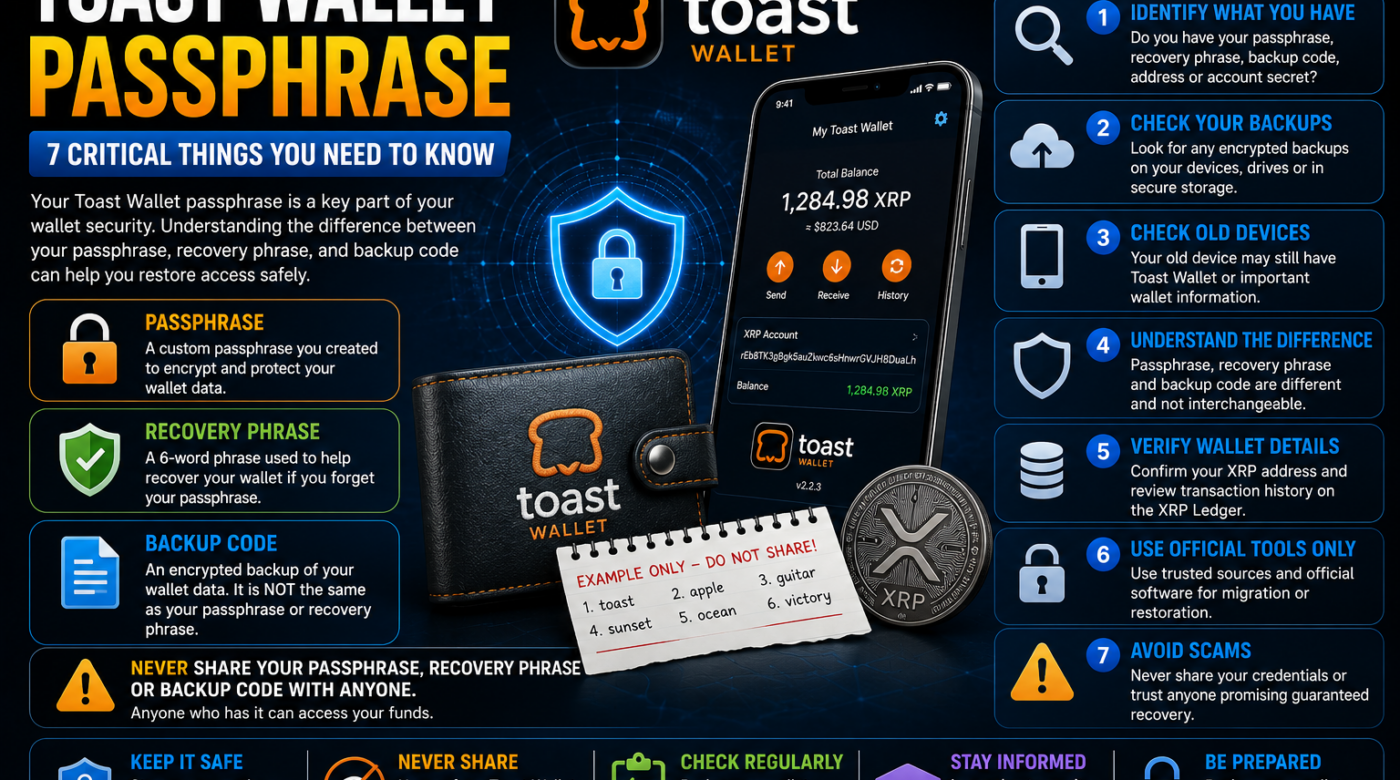
If you are searching for your Toast Wallet passphrase, you may be trying to access an old Toast Wallet, restore XRP, recover a backup, or understand the difference between your passphrase and recovery phrase.
This distinction is extremely important.
Toast Wallet used multiple pieces of information to protect wallet data, and many users mistakenly assume that a recovery phrase alone is a complete wallet backup.
A Toast Wallet passphrase, recovery phrase, and wallet backup serve different purposes. Understanding how they work can help you identify what information you still have and what recovery options may be available.
This guide explains what a Toast Wallet passphrase is, how it differs from a recovery phrase and backup code, and what to do if you are trying to restore access to an old wallet.
Table of Contents
- What Is a Toast Wallet Passphrase?
- Toast Wallet Passphrase vs Recovery Phrase
- Toast Wallet Passphrase vs Backup Code
- Why Your Passphrase Is Important
- 7 Critical Things to Check Before Restoring Your Wallet
- What If You Forgot Your Passphrase?
- What If You Have the Recovery Phrase?
- What If You Have a Backup Code?
- Can You Restore Toast Wallet With Only One Credential?
- How to Stay Safe From Toast Wallet Recovery Scams
- Frequently Asked Questions
- Final Thoughts
What Is a Toast Wallet Passphrase?
A Toast Wallet passphrase was used to protect and encrypt access to wallet information.
In simple terms, the passphrase acted as an important security credential for accessing and using wallet information.
It should not be confused with:
- Your XRP account address
- Your XRP account secret
- Your Toast Wallet PIN
- Your recovery phrase
- Your encrypted wallet backup code
These items have different purposes.
If you are trying to restore an old Toast Wallet, the first step is to identify exactly what information you still possess.
For example, you may have:
- A Toast Wallet passphrase
- A six-word recovery phrase
- An encrypted backup code
- An XRP account address
- An XRP account secret
- An old device with the wallet still installed
Each of these may provide different information or recovery possibilities.
Toast Wallet Passphrase vs Recovery Phrase
One of the biggest sources of confusion is the difference between a Toast Wallet passphrase and a recovery phrase.
They are not the same thing.
The passphrase was used as part of the wallet’s security and encryption process.
The recovery phrase served as an additional recovery mechanism if the passphrase was forgotten.
However, having a recovery phrase should not automatically be treated as the same as having a complete wallet backup.
This is an important distinction for anyone attempting to restore an old Toast Wallet.
Why Does This Matter?
Imagine that your wallet information consists of two different parts:
- The credentials used to unlock and protect access.
- The actual wallet backup containing wallet data.
Having only one piece of information may not always provide everything required to restore the exact wallet configuration.
Before entering any sensitive information into a recovery tool, carefully identify what you have.
Toast Wallet Passphrase vs Backup Code
A Toast Wallet backup code is different from a Toast Wallet passphrase.
The backup contains wallet data that may be used to restore a previously backed-up wallet.
The passphrase is related to protecting access to that wallet information.
This means a person restoring an old wallet may need to understand the difference between:
Passphrase
Used as part of the wallet’s security and encryption.
Recovery Phrase
A separate recovery credential intended to help regain access under certain circumstances.
Backup Code
A backup of wallet data created from the wallet.
This is why people searching for Toast Wallet passphrase should avoid assuming that every code or phrase they find is interchangeable.
Why Is the Toast Wallet Passphrase Important?
Your passphrase was an important part of protecting your wallet.
If you still have access to an old Toast Wallet installation, do not rush to:
- Delete the application
- Reset your device
- Sign out
- Factory reset your phone
- Install random recovery software
- Enter sensitive credentials into an unknown website
Your existing access may contain valuable information needed for migration or recovery.
Before making changes, carefully document what information you still have.
For example, you may want to identify whether you still possess:
- Your passphrase
- Your recovery phrase
- A wallet backup
- An account secret
- Access to the original device
Never publicly post these credentials.
7 Critical Things to Check Before Restoring Your Toast Wallet
1. Identify Your Toast Wallet Passphrase
First, determine whether you still know the passphrase you created.
Do not try random passwords on unknown websites.
If you have a securely stored record of your passphrase, verify that it is the correct one.
A strong passphrase may include:
- Uppercase letters
- Lowercase letters
- Numbers
- Special characters
However, the important thing is using the exact credential associated with your original wallet.
2. Check Whether You Have a Recovery Phrase
Your recovery phrase is different from your passphrase.
If you have a phrase associated with your old Toast Wallet, keep it private.
Do not send it to:
- Social media accounts
- Recovery companies
- Telegram users
- Email contacts
- Unknown support agents
Anyone requesting sensitive wallet credentials should be treated with extreme caution.
3. Look for an Encrypted Wallet Backup
A wallet backup may be one of the most important pieces of information for restoring an old wallet.
Check legitimate locations where you personally stored your backup.
Possible locations may include:
- A secure document
- An old computer
- A backup drive
- A password manager
- Secure personal storage
- Another device where the wallet was previously used
Do not download files from strangers claiming to contain your wallet backup.
4. Check Your Old Devices
If an old phone, tablet, or computer still has access to the wallet, avoid deleting anything.
An existing wallet installation may provide important information.
If the device still works, take time to understand the available options before making changes.
Do not give an unknown person remote access to the device.
5. Identify Your XRP Account Address
An XRP account address may help you identify the correct account and view publicly available blockchain activity.
However, an account address alone does not normally provide the private credentials required to control the account.
Your public address should not be confused with:
- A passphrase
- Recovery phrase
- Account secret
- Private key
6. Determine Whether You Have an Account Secret
An XRP account secret is sensitive information.
Never post it publicly.
Never send it to a person claiming that they need to “verify” your wallet.
If you are migrating an old wallet, carefully follow the security guidance of the destination wallet provider.
7. Verify Every Recovery Tool Before Using It
The internet contains many websites claiming to restore old cryptocurrency wallets.
Be especially cautious if a website:
- Requests your passphrase immediately
- Requests your recovery phrase
- Guarantees that it can recover your XRP
- Demands an urgent payment
- Claims that your wallet must be verified
- Contacts you unexpectedly
Never assume a website is legitimate because it has a professional design.
What If I Forgot My Toast Wallet Passphrase?
If you forgot your Toast Wallet passphrase, the first step is to determine what other legitimate recovery information you still have.
For example:
- Do you still have the recovery phrase?
- Do you have an encrypted wallet backup?
- Is the wallet still accessible on an old device?
- Do you have another legitimate credential connected to the wallet?
Do not attempt to guess credentials through unknown third-party websites.
If you still have access to your original wallet, avoid making unnecessary changes that could cause you to lose that access.
What If I Have My Toast Wallet Recovery Phrase?
Having a recovery phrase may be useful, but it is important not to assume that the phrase is identical to a complete wallet backup.
The recovery phrase and the wallet backup may have different purposes.
If you still have both your recovery phrase and a wallet backup, keep them secure and do not provide them to another person.
Before attempting migration or restoration, make sure you understand exactly what each piece of information represents.
What If I Have a Toast Wallet Backup Code?
If you have an old backup code, treat it as highly sensitive wallet information.
Do not:
- Post it online
- Email it to strangers
- Upload it to random websites
- Send it through social media
The safest approach is to carefully verify any software or migration process before entering the backup.
A backup may contain sensitive information about your wallet and accounts.
Can I Restore Toast Wallet With Only My Passphrase?
This depends on the exact wallet configuration and the information available.
A passphrase by itself may not always contain the complete wallet data needed to recreate an old wallet.
This is why you should identify all available information before attempting recovery.
You may have:
- Only the passphrase
- Only the recovery phrase
- Only the backup
- Both the backup and passphrase
- An active wallet on an old device
- An XRP account secret
Each situation can be different.
Avoid assuming that one credential automatically replaces every other wallet credential.
What If I Only Have My XRP Address?
An XRP address is generally public information.
You may be able to use the address to view public blockchain information, such as:
- Transactions
- XRP balances
- Account activity
However, knowing an XRP address does not automatically provide control of the account.
You generally need the appropriate private credentials to access and authorize activity from a self-custody account.
Can I Recover My Toast Wallet After Losing My Phone?
Possibly, depending on the information you still have.
Before assuming the wallet is permanently lost, check whether you have:
- A backup
- Your passphrase
- Your recovery phrase
- Another device
- Relevant account credentials
The important thing is to avoid rushing into a scam.
Losing a phone can create a stressful situation, and scammers frequently target people searching for cryptocurrency recovery assistance.
Is Toast Wallet Still Safe to Use?
Anyone dealing with an old Toast Wallet should be aware that the original Toast Wallet project is no longer actively maintained.
For this reason, users researching an old wallet should be particularly careful about fake websites and unofficial applications pretending to be the original service.
If you are considering moving an old wallet to another supported solution, verify the migration process independently and follow current security guidance.
7 Toast Wallet Passphrase Scams to Avoid
1. Fake Toast Wallet Websites
A website may use the Toast Wallet name and request your passphrase.
Do not enter sensitive credentials without independently verifying the software.
2. Fake Support Agents
Someone may contact you and claim to be official support.
Never assume an unsolicited message is legitimate.
3. Recovery Phrase Requests
Never share your recovery phrase with a stranger.
4. Guaranteed XRP Recovery
Be cautious of anyone promising guaranteed results.
5. Advance Fee Requests
Someone may demand a payment before supposedly helping with recovery.
High-pressure payment demands are a warning sign.
6. Remote Access Requests
Do not give an unknown person control of your computer or phone.
7. Fake Wallet Verification
A website may claim that you must enter your credentials to verify or activate your XRP wallet.
Treat this as a serious warning sign.
How to Protect Your Toast Wallet Information
If you still have access to old Toast Wallet credentials, take security seriously.
Consider these basic practices:
Keep Credentials Separate
Do not store all sensitive information together unnecessarily.
Never Share Your Passphrase
Your passphrase should remain private.
Protect Your Recovery Phrase
Do not post or send it to anyone.
Protect Your Backup
Treat wallet backup information as sensitive.
Verify Migration Tools
Use carefully verified software and processes when moving assets from an old wallet.
Avoid Unsolicited Help
Be cautious when strangers contact you first.
Frequently Asked Questions About Toast Wallet Passphrase
What is a Toast Wallet passphrase?
A Toast Wallet passphrase was an important security credential used to protect and encrypt wallet information.
Is the Toast Wallet passphrase the same as the recovery phrase?
No. The passphrase and recovery phrase are different credentials and should not be treated as interchangeable.
Is the recovery phrase a complete Toast Wallet backup?
No. A recovery phrase should not automatically be treated as the same thing as a complete wallet backup.
What if I forgot my Toast Wallet passphrase?
Check whether you still have legitimate recovery information, backups, or access to the original wallet before making changes.
Can I recover my wallet with only my XRP address?
An XRP address may allow you to view public account activity, but the address alone does not normally provide control over the account.
Should I share my Toast Wallet passphrase with support?
No. Never provide your sensitive wallet credentials to an unknown person.
Can a recovery company guarantee access to my wallet?
Be cautious of guaranteed recovery claims, especially when the person requests sensitive credentials or urgent payment.
What should I do if my old Toast Wallet is still accessible?
Avoid deleting or resetting the wallet immediately. Carefully review your available information and security options before making changes.
Final Thoughts on Toast Wallet Passphrase
If you are searching for Toast Wallet passphrase, the most important thing is to understand the difference between your passphrase, recovery phrase, and wallet backup.
These pieces of information may serve different purposes.
Before attempting to restore or migrate an old wallet, identify exactly what you still have.
Check for:
- Your Toast Wallet passphrase
- Recovery phrase
- Encrypted backup
- Account information
- Access to an old device
Do not rush.
Do not share sensitive credentials.
Do not trust websites simply because they use the Toast Wallet name.
And do not provide your passphrase or recovery information to someone who contacts you unexpectedly.
Careful verification and understanding the information you still possess can help you make safer decisions when dealing with an old cryptocurrency wallet.